Preserve first, then search
A client delivers a laptop that may contain evidence of employee misconduct, disputed communications or confidential information being copied. The temptation is understandable: open it, search a few names and see what is there.
But a running laptop continues to change as it is used. A well-intentioned search can introduce new activity into the very records a forensic examiner may later need to interpret.
For lawyers, the practical starting point is simple: get preservation advice before searching the original device. That early step helps keep the investigation focused on the underlying events rather than questions about what happened after the laptop changed hands.
A quick look can leave a forensic footprint
Opening files, browsing folders and launching applications may change timestamps or other system records. The effects depend on the operating system, application and settings. It would be inaccurate to say that every click changes every timestamp: Microsoft, for example, documents configurable NTFS last-access behaviour. The absence of a visible change does not establish that an interaction left no trace. [1]
This matters when the question is whether someone accessed a document, used an application or handled information at a particular time. Later review activity can become another event that must be distinguished from the conduct under investigation.
Illustrative scenario: A lawyer opens a spreadsheet to check whether it is relevant. Later, the examination identifies activity associated with opening that file. The examiner must consider whether the record relates to the original user, the lawyer’s review or another process. A contemporaneous note helps; avoiding unnecessary interaction helps more.
The computer can change while nobody is touching it
A live system may continue writing data in the background. Operating-system and application activity can affect the records available for examination. Software updates, automatic processes and continued use should therefore be considered when deciding how to preserve a device.
NIST’s forensic guidance explains the importance of preserving file information and examining working copies rather than originals. It also recognises that collection from a running system is different from acquiring static media. [2]
Cloud-connected files introduce another complication. A document visible in a folder may be an online-only placeholder. Opening it can download its contents and change what is stored locally. Microsoft describes this behaviour for OneDrive Files On-Demand. [3]
Finding a document on screen is therefore not the same as establishing what was present on the laptop before the review began.
Why forensic imaging comes before ordinary review
A forensic acquisition creates a documented dataset for examination. Where appropriate and technically feasible, that may include an image of the storage media. The examiner selects the method for the device, the available access and the questions being investigated.
The process should address integrity verification, acquisition records and a working copy for examination. A forensic image is not a guarantee that every relevant record exists or can be recovered, and a laptop image alone may not preserve evidence held only in cloud services. [4]
The benefit to counsel is practical: searches and analysis can proceed against preserved material, with a clearer record of what was collected and how.
Imaging after an informal search can still be valuable. It cannot, however, recreate the exact state that existed before that search.
Do not assume the answer is to switch it off
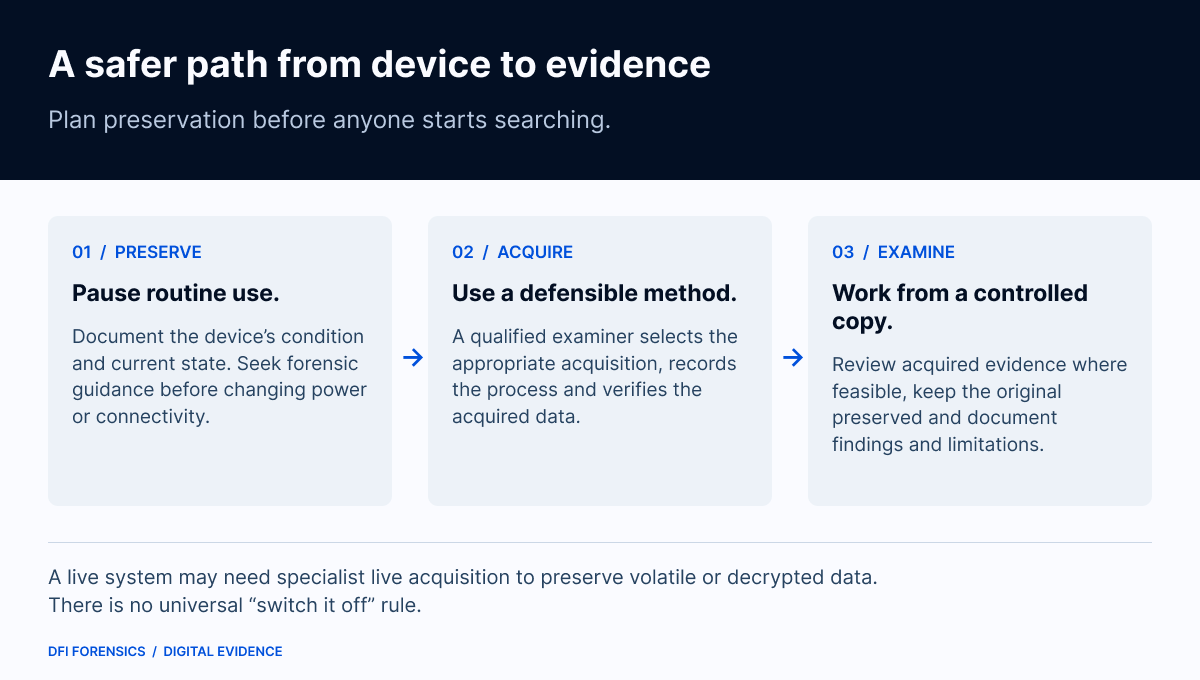
“Preserve first” does not mean “always shut down immediately.”
An unlocked, encrypted laptop may provide access that is lost after shutdown. Memory and other volatile information can also require prompt collection. A qualified examiner may recommend a controlled live acquisition and document the changes that the process necessarily causes. SWGDE expressly recognises live acquisition as potentially essential for encrypted systems. [4]
That is why routine browsing and examiner-led live collection should not be treated as equivalent. Decisions about power, network connectivity and acquisition need to fit the circumstances.
What to do when a laptop may be evidence
Before anyone starts looking through its contents:
-
Pause ordinary use. Avoid exploratory searches, installing software or opening potentially relevant applications.
-
Record its condition. Note who supplied it, when it was received and its apparent power and login state, without navigating through the system.
-
Secure it and limit handling. Keep a clear record of possession and any actions already taken.
-
Seek prompt forensic guidance. Explain the legal questions, relevant dates, urgency and known device or account restrictions.
-
Plan the review. Agree on lawful access, scope, confidentiality and any privilege-review requirements before examination.
These are preservation priorities, not a universal shutdown or collection procedure. SWGDE’s collection guidance emphasises securing evidence against unwanted change, using minimally invasive techniques and documenting live collection. [5]
If someone has already searched the laptop
Do not try to remove the traces of that review. Record what happened: who used the device, when, which applications or files were opened, and whether anything was copied, installed or changed.
Previous access does not automatically make the evidence unusable. It does mean the examiner needs that history to assess the available records and explain any limitations. Avoid drawing conclusions about admissibility or the outcome of a case from the fact of access alone.
Protect the evidence before the review begins
DFI Forensics helps lawyers preserve, examine and explain digital evidence from computers, phones, email and cloud sources. Early involvement helps define an appropriate collection and examination plan around the questions your case needs to answer.
Have a laptop that may contain relevant evidence? Contact DFI Forensics before searching it, or call 778-742-5621.
General forensic information, not legal advice. Preservation and examination decisions depend on the device, its state, lawful authority and the circumstances of the matter.
THE PRACTICAL TAKEAWAY
Preserve first, then search. Seek forensic advice before ordinary review, and let the device’s state and the needs of the matter guide collection.
Sources
- 1. Microsoft Learn — fsutil behaviour (opens in a new tab)
- 2. NIST SP 800-86 — Guide to Integrating Forensic Techniques into Incident Response, sections 4.2–4.5 (2006) (opens in a new tab)
- 3. Microsoft Support — Save disk space with OneDrive Files On-Demand (opens in a new tab)
- 4. SWGDE — Best Practices for Computer Forensic Acquisition, v2.1 (5 August 2025) (opens in a new tab)
- 5. SWGDE — Best Practices for Digital Evidence Collection, v2.0 (30 June 2025) (opens in a new tab)
- DFI Forensics — Contact (opens in a new tab)
General information, not case-specific forensic, legal or incident-response advice. An article does not establish an engagement.